


What Is an Optical Cord? Your Ultimate Guide to TOSLINK Cables & Optical Audio Cables
Key Takeaways:
•An optical cord—also called a TOSLINK cable or optical audio cable—uses pulses of light in a glass or plastic fibre core to transmit digital audio free from electromagnetic interference.
•Optical cords support PCM stereo, Dolby Digital 2.0–5.1, DTS Digital Surround, DTS-ES Matrix/Discrete 6.1, and DTS 96/24, but not lossless codecs like Dolby TrueHD, DTS-HD MA, or immersive formats like Dolby Atmos.
•Ideal for connecting legacy AV receivers, soundbars, game consoles, and TVs when HDMI ARC/eARC isn’t available or reliable.
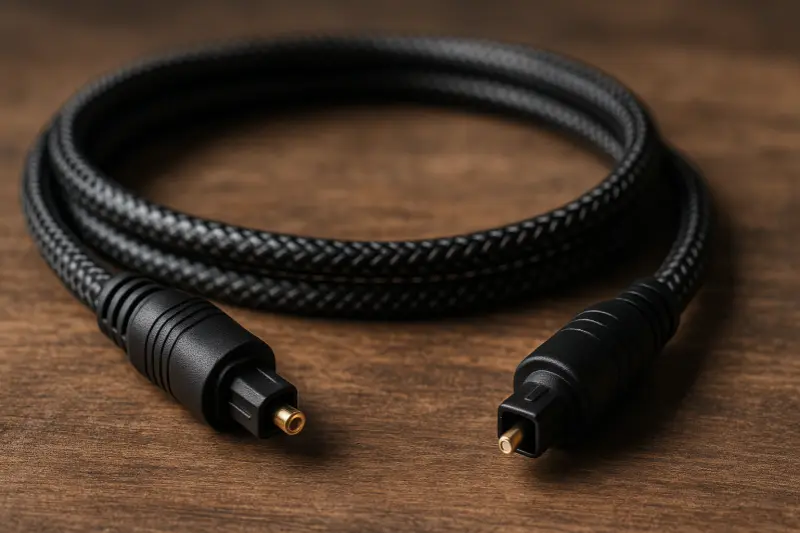
•Available in plastic-fibre and glass-fibre variants, as standard square TOSLINK and mini-TOSLINK (3.5 mm) connectors, and in durable nylon-braided jumpers for heavy use.
•Best practices: limit cable runs (≤5 m plastic, ≤10 m glass), avoid sharp bends, use dust caps, clean connectors, and add repeaters for long distances.
1. What Is an Optical Cord (TOSLINK Cable) and Why Use an Optical Audio Cable?
When users search “what is an optical cord”, they seek a clear definition of how optical audio cable technology works. Marketed under the trademark TOSLINK (Toshiba Link), an optical cord transforms electrical audio signals into light pulses via an LED transmitter, channels them through a low-loss fibre core, then reconverts them with a photodiode at the receiver. This process eliminates electromagnetic interference (EMI), ground-loop hum, and crosstalk common with copper cables, ensuring high-fidelity sound for home theatre and professional AV installations [1].
2. How Do Optical Cords Transmit High-Fidelity Digital Audio?
2.1 The Science of Total Internal Reflection in Fibre-Optic Audio
Optical cords rely on total internal reflection: light enters the fibre core at angles above the critical angle, reflecting off the cladding boundary to propagate with minimal attenuation. This allows audio-grade cables to maintain signal integrity over several meters without metal shielding [2].
2.2 LED Transmitters & Photodiode Receivers for PCM and Dolby Digital
At the source, a high-speed LED pulse encodes PCM or compressed surround-sound data. At the sink, a silicon photodiode converts light back into electrical pulses, which the AV decoder unpacks into analog speaker outputs. This conversion chain preserves timing accuracy, critical for synchronizing multi-channel audio [3].
3. Exploring Optical Cord Types & Next-Level Connector Options
3.1 Plastic Fibre (POF) vs. Glass Fibre (GOF) TOSLINK Cables: Pros & Cons
•POF (Plastic Optical Fibre): Highly flexible and cost-effective for home use, supports ≤5 m. Higher attenuation limits length and bandwidth.
•GOF (Glass Optical Fibre): Lower loss and higher bandwidth for runs up to 10 m, or 30 m with in-line boosters. More fragile; avoid tight bends and kinks [3].
3.2 Standard TOSLINK vs. Mini-TOSLINK (3.5 mm) Cables
•Standard TOSLINK: Square ferrule fits dedicated optical ports on AV receivers and TVs.
•Mini-TOSLINK (3.5 mm): Round ferrule for compact devices (laptops, portable CD players). Adapters enable cross-compatibility between mini and standard ports [3].
3.3 Premium Nylon-Braided Fibre-Optic Jumpers for Durability
For high-traffic AV racks, choose nylon-braided jackets for abrasion resistance and flexibility. These jumpers withstand frequent plugging and rough handling without compromising signal quality [4].
4. Optical Audio Cable vs. Coaxial Digital Audio vs. HDMI ARC/eARC
|
Feature |
Optical Audio Cable |
Coaxial Digital Audio Cable |
HDMI ARC/eARC |
|
Transmission Medium |
Light pulses in fibre |
Electrical pulses in copper |
Electrical pulses in copper |
|
Electromagnetic Interference Immunity |
Complete immunity |
Partial; requires shielding |
Partial; requires shielding |
|
Supported Audio Formats |
PCM 2.0; Dolby Digital 2.0–5.1; DTS; DTS-ES 6.1; DTS 96/24[2] |
Same as optical (SPDIF) |
All modern lossless and immersive codecs (TrueHD, Atmos, DTS:X) |
|
Video Pass-Through |
No |
No |
Yes |
|
Maximum Reliable Run Length |
≤5 m plastic; ≤10 m glass; ≤30 m with booster[3] |
≤10 m |
≤5–15 m |
|
Best Use Case |
Audio-only, EMI-free setup |
Budget-conscious legacy setups |
One-cable A/V for audio+video |
When to choose each:
•Optical: Audio isolation, no hum, compatible with most receivers and soundbars.
•Coaxial: Similar audio quality at lower cost; more flexible cable.
•HDMI ARC/eARC: Single-cable convenience for high-definition audio and video, supports newcomer immersive formats.
5. Buying Guide & Regional Availability for TOSLINK & Fibre Cables
5.1 How to Choose the Right Cable Length & Jacket Material
•Run Length: For typical home systems, plastic fibre TOSLINK ≤5 m; glass fibre ≤10 m.
•Jacket: PVC for indoor home use; nylon-braided for durability; LSZH for fire-sensitive or commercial installations [1].
5.2 Connector Types for Network Fibre vs. Audio Fibre
•Network Fibre Jumpers: Use FC, SC, ST or LC connectors on multimode or single-mode fibres for data networks.
•Audio Optical Cables: Use standard square TOSLINK or mini-TOSLINK connectors designed for SPDIF audio [5].
5.3 Where to Buy Optical Audio Cables Near You
•Search “buy TOSLINK cable online” with geo-modifier (e.g., “UK,” “Australia,” “Canada”).
•Major electronics distributors: RS Components, Digi-Key, Mouser; retail: Amazon, Best Buy, local AV specialists.
•Specialty brands: SVS SoundPath, CABLECREATION, Van Damme, Belkin.
6. Installation & Best Practices for Optimal Optical Audio Performance
6.1 Maintain Minimum Bend Radius & Avoid Kinks
Ensure cable bends are no tighter than 10× the cable diameter. Sharp bends can crack the fibre core and cause signal loss [3].
6.2 Clean and Protect Fibre Connector Ends
Use lint-free swabs and 90–99% isopropyl alcohol to gently clean ferrule end faces. Always replace dust caps when disconnected to prevent contamination [3].
6.3 When to Use Repeaters or Active Boosters
For audio runs beyond 10 m (glass fibre) or 5 m (plastic fibre), install TOSLINK repeaters or active extenders to preserve signal strength and prevent dropouts.
7. Advanced Topics: Troubleshooting & Optimizing Your Optical Cord Connection
7.1 Common Causes of “No Sound” on Optical Audio
•Source output not set to SPDIF audio
•Dirty or damaged connectors
•Cable too long or bent beyond minimum radius
7.2 How to Diagnose Signal Integrity Issues
•Swap with known-good cable to isolate unit vs. cable faults
•Check for red LED illumination at source (indicates active light transmission)
•Verify AV receiver input assignment matches optical port
7.3 Integrating Optical Cords in Complex A/V Racks
•Label both ends clearly; use colour-coded dust caps
•Bundle with Velcro straps, avoid over-tightening zip ties around cables
8. 10 FAQs People Ask About Optical Cords, TOSLINK Cables & Digital Audio Fibre
1.What is an optical cord used for in home theatre?
It connects audio sources (Blu-ray, TV, game console) to receivers or soundbars, ensuring EMI-free digital audio [1].
2.How long can I run a TOSLINK optical cable without signal loss?
Plastic ≤5 m; glass ≤10 m unpowered; ≤30 m with an active booster[3].
3.Can a fibre-optic cable carry Dolby Atmos or DTS:X?
No; limited by SPDIF bandwidth to Dolby Digital and DTS-ES formats. Immersive codecs require HDMI eARC.
4.Why is there red light coming from my TV’s optical output?
It’s the LED emitter indicating an active optical audio signal; it’s safe and expected [2].
5.How do I connect a mini-TOSLINK port on my laptop to my AV receiver?
Use a mini-TOSLINK to standard TOSLINK adapter or cable with one 3.5 mm ferrule and one square ferrule [3].
6.Should I choose plastic-core or glass-core optical audio cable?
For short home runs plastic is fine; for critical installs or runs >5 m, glass offers lower loss [3].
7.How do I set my TV to output audio via optical cord?
In the TV’s audio settings, select “Digital Audio Out (Optical)” or “SPDIF” and disable TV speakers if needed [6].
8.Can I convert optical audio to coaxial SPDIF with a passive adapter?
No; requires an active SPDIF converter to change signal medium (light to electrical) [4].
9.What should I do if my optical cable isn’t transmitting sound?
Clean connectors, check settings, swap cables, and inspect for bends or damage [2].
10.Are optical cables completely immune to ground-loop buzz?
Yes; optical isolation prevents ground loops inherent in copper cabling [1].
Citations:
[1] “Optical Audio Cable: What is it and Why Use it?”
[2] “What Is the Optical Audio Port, and When Should I Use It?”
[3] “TOSLINK,”
[4] “What are Digital Optical Cables?”
[7] “TOSLINK vs Optical: Choosing the Best Audio Connection,”
[5] “Fiber-optic cable,”
[6] “How To Connect External Audio Using An Optical Cable,”
1.https://uk.rs-online.com/web/content/discovery/ideas-and-advice/optical-audio-cables
2.https://www.svsound.com/blogs/svs/what-are-digital-optical-cables
3.https://www.customht.com.au/b
4.https://patents.google.com/patent/CN111708125B/zh
5.https://www.cisco.com/c/dam/en/us/td/docs/video/access_edge/OptoStar_2/Cisco-OptoStar-II-Optical-Switch-Module-Installation-and-Operation-Guide-Chinese.pdf
6.https://blog.sina.com.cn/s/blog_e614fadd0101gief.html
7.https://patents.google.com/patent/CN115993687A/zh